Custom Branding
Watchman Monitoring Custom Branding
Watchman Monitoring is “white label” by default.
As a subscriber, you can rebrand our monitoring solution with a custom logo and title.
Customization currently includes:
- The Contact Menu icon
- The Installer.app background image
- Customized greeting and summary in the Installer.app process
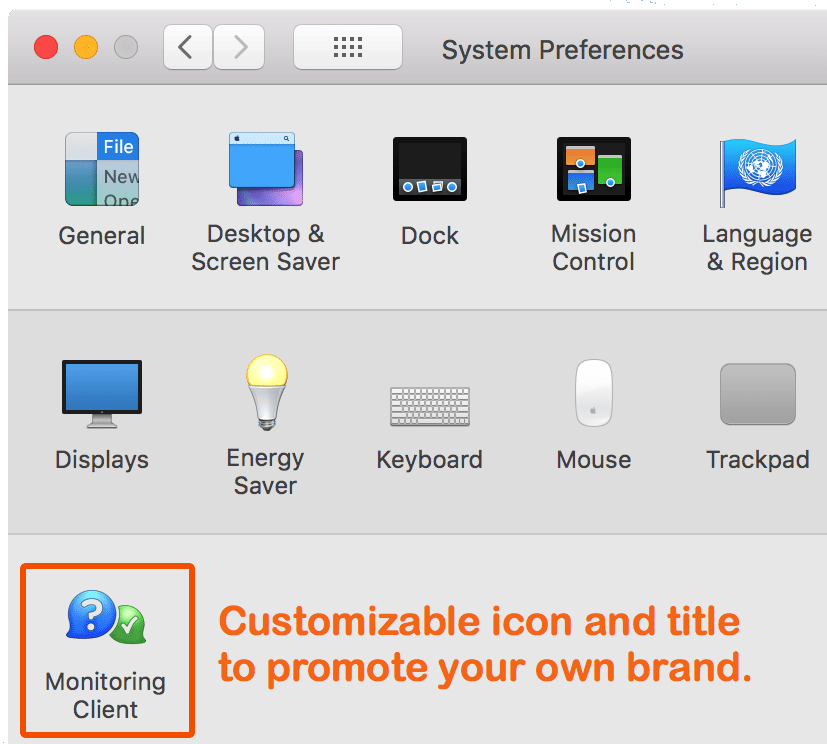
- Customize Monitoring Client to your brand
- Your logo in your end users’ System Preferences
- Your Watchman Monitoring Dashboard
- Your logo on PDF Reports
How to send us your branding
Email [email protected] with the subject “Custom Branding”. That link opens a message with these questions ready to fill in. Tell us:
- Your subdomain, the part of your login address before .monitoringclient.com.
- Whether this is a free adjustment to branding you have already paid for, or a translation for the agent.
- Your new PreferencePane title, up to 4 words (optional).
- Your email subject prefix, the start of the subject line of emailed reports. Leave it out for the default, [Monitoring Client].
- Your support URL prefix text.
- When to publish it: as soon as you approve the proof, or at a specific time.
- Anything else we should know.
Attach your images. Send only the parts you want to change.
| Image | Size | Needed |
|---|---|---|
| Logo for the Dashboard | 360 x 80 pixels at 72 dpi | Yes |
| Square logo for macOS | 512 x 512 pixels at 72 dpi | Yes |
| Square logo for Windows | 256 x 256 pixels at 72 dpi | Yes |
| Logo for PDF reports | At least 450 x 130 pixels at 72 dpi, or 300 dpi | Yes |
| Background image for the installation package | 620 x 418 pixels at 72 dpi | Optional |
| Retina logo for the Contact Menu | 32 x 32 pixels at 72 dpi | Optional |
| Standard logo for the Contact Menu | 16 x 16 pixels at 72 dpi | Optional |
| Installer Introduction and Summary text | .rtf files | Optional |
PNG is preferred, but we can work with most image formats. If your files are large, send them as a single .zip. We reply with a proof for your approval before anything goes live.
FAQs
How long does the Custom Branding process take?
A sample of your branded installer is provided for your approval shortly after your complete submission. Once approved, your custom branding will propagate to your end users’ computers as a part of our auto-updating process.
What if I want to make a change later?
Custom Branding is a one-time purchase. Submit change requests as needed, and a proof will be returned for your approval.
How do I submit a change to my Custom Branding?
Email us as described above, say it is a free adjustment, and include only the part you wish to change. We will send a proof for your review.
PNG? ICNS? What if I don’t have my image in the right format?
We are happy to convert images as needed. Please ensure that the logo for the PreferencePane is square, and the images for the Installer.app and installation dmg are 620 x 418 pixels. We’ll handle the rest.
What actions should I take after Custom Branding is approved and posted?
Replace any installers you’ve downloaded prior to branding with a new, branded version. This includes any installers you may have hosted on your website or copied to USB flash drives. This would also be a good time to update any computers that have the auto-update feature turned off.
What if I only want to change the language in the installer’s Introduction and Summary .rtf files to my local language?
We will gladly make this change free of charge. Just submit the Introduction and Summary files in your local language as a free adjustment, and we will add them to your installer.