What is Watchman Monitoring?
Watchman Monitoring is a Software as a Service (SaaS) offering which monitors the health of Mac, Linux, and Windows computers. We are dedicated to enabling Subscribers to provide proactive support to their users.
Our service helps Subscribers to take direct action to solve problems, prevent data loss, and build confidence with users. We detect and warn about 100+ issues that affect computers.
The Watchman Monitoring Service
Our monitoring system provides hourly reports on health issues such as disk I/O errors, backup status, malware, and RAIDs.
Watchman Monitoring consists of two primary components:
Monitoring Client
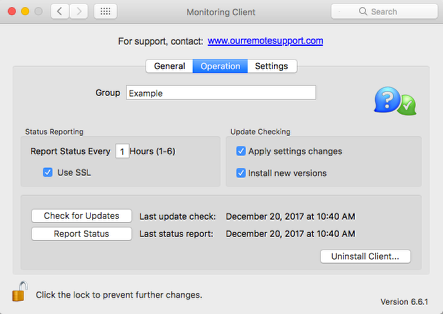
Subscribers install the Monitoring Client on every Mac, Linux and Windows computer managed. The agent runs hourly, taking less than a minute to run, and reports its findings to the Watchman Monitoring Server, where the report is saved as a computer record.
Watchman Monitoring Server
The Watchman Monitoring Server collects reports from monitored computers and notifies Subscribers as issues are detected. The server also allows the Subscriber to create an exportable inventory of machines and machine demographics.
Getting Started with Watchman Monitoring
The following articles will help you get started with Watchman Monitoring, deploying the Monitoring Client, customizing the Contact Menu, handle reported issues and integrate other solutions.
Watchman Monitoring Server
There are a number of areas of the Watchman Monitoring Server you would be familiar with as you begin to use Watchman Monitoring:
- The Computer Overview provides a complete picture of the computer, plugins, warnings and alerts.
- Generate Computer Overview Report as a PDF for a professional report to share with users.
- Archive / Un-Archive Computers that may not report in for a period of time, such as a school lab or user on leave.
- Copy Computer Specs to the Clipboard for before and after snapshots at the service bench.
Deploy your Monitoring Client
Watchman Monitoring makes it easy to deploy your Monitoring Client is easy for all platforms:
Mac
- Visit the Mac Installer page in your Dashboard.
- Use Apple Remote Desktop to deploy the Monitoring Client.
- Deploying Watchman Monitoring using Munki.
Windows
- Visit the Windows Installer page in your Dashboard.
- Using the Windows MSI Monitoring Client Installer.
Linux
- Visit the Linux Installer page in your Dashboard.
- Monitoring Client for Linux Overview.
Customize the Contact Menu
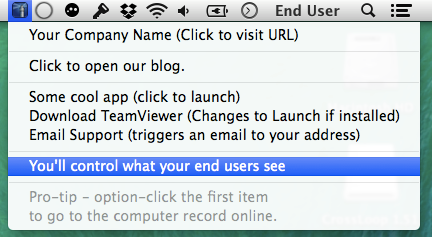
The optional Contact Menu can help ease your support burden by putting resources in easy access for your users. Consider links to your support ticketing system, favorite screen sharing tool, file share, bookmarks and more.
- Begin by Showing the Contact Menu.
- Customize the Contact Menu.
- See the extensive list of Contact Menu Tips & Tricks for more ideas.
Handling Reported Issues
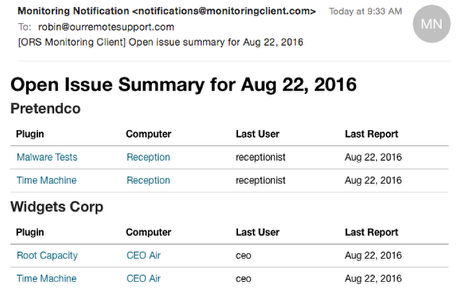
By default, Watchman Monitoring generates an email for each issue and warning.
- Learn about Monitoring Notification Emails and how to sort based on subject and header information.
- You can Quick-mute Plugins via emailed links.
- Learn about the About the Daily Missing Report.
- And, learn how to Mute Multiple Plugin Results At One Time.
Integrations
Watchman Monitoring integrates with a number of complementary services, learn more about the various integrations below:
Ticketing Systems
Remote Management Systems
Screen Sharing Tools
IT Documentation
Taking Watchman Monitoring further
Visit our Community forums for more ideas on how other subscribers are utilizing Watchman Monitoring, Tips, Tricks and more!
Permalink: https://watchmanmonitoring.com/what-is