Enabling PDFs to display in your browser
If Group Status PDFs do not display, your browser’s PDF plugin may be disabled.
Enabling Chrome’s PDF viewer
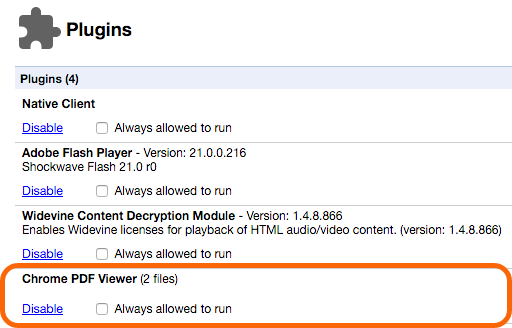
In Chrome’s address bar visit:
chrome://plugins
Enable Chrome PDF Viewer
Disabling Adobe’s Acrobat Extension for Safari
Sometimes Adobe’s PDF plugin may cause problems with Safari displaying PDFs natively. To disable the plugin:
Go to
/Library/Internet Plug-Ins
If you see the: AdobePDFViewer plugin in the Internet Plug-Ins folder, move it to the trash.
Quit and relaunch Safari then try opening a PDF file.